Blog Posts
Posts use the summary_large_image Twitter card type when a social cover is
available and the image-optional summary type otherwise. The following
meta tags are generated:
Meta Tag |
Source |
|---|
twitter:card
|
"summary_large_image" with a cover, otherwise "summary"
|
twitter:title
|
page.seo_title, falling back to page.title
|
twitter:description
|
page.search_description, falling back to page.title
|
twitter:image
|
social_cover_image_url (1200x630 rendition)
|
twitter:image:alt
|
cover_alt_text
|
og:url
|
absolute_page_url
|
og:title
|
page.seo_title, falling back to page.title
|
og:description
|
page.search_description, falling back to page.title
|
og:image
|
social_cover_image_url
|
og:image:alt
|
cover_alt_text
|
og:image:width
|
social_cover_image_width (only if image exists)
|
og:image:height
|
social_cover_image_height (only if image exists)
|
og:type
|
"article"
|
og:site_name
|
Parent blog title |
article:published_time
|
First publication time, falling back to the post’s visible date |
article:modified_time
|
Last publication time, falling back to the post’s visible date |
Post pages also emit a canonical link and BlogPosting JSON-LD containing
the canonical URL, title, description, publication/modification dates, author,
and social image when available. Image tags are omitted entirely when neither
the post nor its parent blog has a cover; empty image URLs are not emitted.
The seo_title and search_description fields are standard Wagtail
page fields. Set them in the Promote tab of the Wagtail editor or through
the editor API. Empty fields fall back to page.title so older content never
emits blank Open Graph or Twitter titles/descriptions, though a concise explicit
description remains strongly recommended.
Podcast Episodes
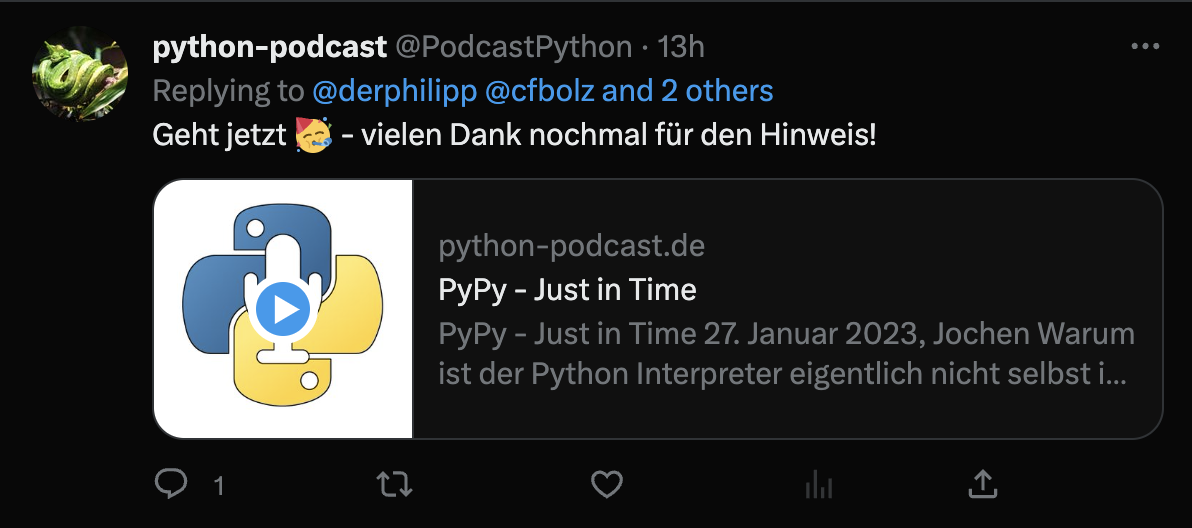
Episodes with an attached podcast_audio file reuse the shared title,
description, image, timestamp, and canonical metadata. When a social cover is
also available they select the Twitter Player Card
type, enabling inline audio playback directly in the Twitter/X timeline. A
coverless audio episode falls back to an image-optional summary card because
Player Cards require an image. Both paths emit PodcastEpisode rather than
BlogPosting JSON-LD and use absolute player/audio URLs.
In addition to the shared tags above, episodes add:
Meta Tag |
Source |
|---|
twitter:card
|
"player" (overrides summary_large_image)
|
twitter:player
|
player_url (the Twitter Player view URL)
|
twitter:player:stream
|
episode.podcast_audio.m4a.url
|
twitter:player:stream:content_type
|
"audio/mp4"
|
twitter:player:width
|
480
|
twitter:player:height
|
240
|
og:audio
|
episode.podcast_audio.m4a.url
|
If the episode has no audio file, the template falls back to the standard post
metadata, including the cover-dependent summary_large_image/summary
choice. If it has audio but no cover, Open Graph still receives og:audio
while Twitter receives the valid non-player summary card.
Social Media
Django Cast automatically generates Open Graph and Twitter Card meta tags for posts and episodes, enabling rich social previews when links are shared.
Social Cover Images
Cover images are the primary visual element in social previews. Django Cast uses a two-level fallback for the cover image:
The post’s or episode’s own
cover_imagefield (set in the Wagtail editor).The parent blog’s
cover_imagefield as a fallback.If neither is set, no image meta tags are emitted.
The social preview image uses a 1200x630 JPEG rendition through Wagtail’s focal-point-aware cropping (rendition spec:
fill-1200x630|format-jpeg|jpegquality-75). This matches the 1.91:1 aspect ratio recommended by most social platforms. Wagtail does not upscale a smaller source, so use an image at least 1200x630 when those exact output dimensions are required. The URL and actual rendition dimensions are emitted so social scrapers can fetch and describe the result correctly.To customize the social preview image for a post, set the Cover image field in the Wagtail editor. Choose an image with a focal point set for best results with the fill-crop.
The
cover_alt_textfield provides alt text for the social image. Set this in the Wagtail editor alongside the cover image.Open Graph and Twitter Card Meta Tags
Post templates emit meta tags inside a
{% block social_meta %}block, which is nested inside{% block meta %}. Theme authors can override this block to customize social meta output. The default post metadata is rendered bycast/includes/post_social_meta.htmlso the built-in Bootstrap 4 and plain themes share the same fallbacks and structured-data contract. External themes must opt into that partial; cast-bootstrap5 0.0.77 does so, while other themes retain their own metadata behavior until updated.Blog Posts
Posts use the
summary_large_imageTwitter card type when a social cover is available and the image-optionalsummarytype otherwise. The following meta tags are generated:Meta Tag
Source
twitter:card"summary_large_image"with a cover, otherwise"summary"twitter:titlepage.seo_title, falling back topage.titletwitter:descriptionpage.search_description, falling back topage.titletwitter:imagesocial_cover_image_url(1200x630 rendition)twitter:image:altcover_alt_textog:urlabsolute_page_urlog:titlepage.seo_title, falling back topage.titleog:descriptionpage.search_description, falling back topage.titleog:imagesocial_cover_image_urlog:image:altcover_alt_textog:image:widthsocial_cover_image_width(only if image exists)og:image:heightsocial_cover_image_height(only if image exists)og:type"article"og:site_nameParent blog title
article:published_timeFirst publication time, falling back to the post’s visible date
article:modified_timeLast publication time, falling back to the post’s visible date
Post pages also emit a canonical link and
BlogPostingJSON-LD containing the canonical URL, title, description, publication/modification dates, author, and social image when available. Image tags are omitted entirely when neither the post nor its parent blog has a cover; empty image URLs are not emitted.The
seo_titleandsearch_descriptionfields are standard Wagtail page fields. Set them in the Promote tab of the Wagtail editor or through the editor API. Empty fields fall back topage.titleso older content never emits blank Open Graph or Twitter titles/descriptions, though a concise explicit description remains strongly recommended.Podcast Episodes
Episodes with an attached
podcast_audiofile reuse the shared title, description, image, timestamp, and canonical metadata. When a social cover is also available they select the Twitter Player Card type, enabling inline audio playback directly in the Twitter/X timeline. A coverless audio episode falls back to an image-optionalsummarycard because Player Cards require an image. Both paths emitPodcastEpisoderather thanBlogPostingJSON-LD and use absolute player/audio URLs.In addition to the shared tags above, episodes add:
Meta Tag
Source
twitter:card"player"(overridessummary_large_image)twitter:playerplayer_url(the Twitter Player view URL)twitter:player:streamepisode.podcast_audio.m4a.urltwitter:player:stream:content_type"audio/mp4"twitter:player:width480twitter:player:height240og:audioepisode.podcast_audio.m4a.urlIf the episode has no audio file, the template falls back to the standard post metadata, including the cover-dependent
summary_large_image/summarychoice. If it has audio but no cover, Open Graph still receivesog:audiowhile Twitter receives the valid non-playersummarycard.Twitter Player View
The Twitter Player Card requires a URL pointing to an embeddable player page. Django Cast provides this via the
twitter_playerview at:URL name:
cast:twitter-playerThis view renders a minimal HTML page (
cast/twitter/card_player.html) containing only a Podlove Web Player play button. The page is designed to be embedded in a 480x240 iframe by Twitter/X.The player is initialized with:
The episode’s M4A audio file URL
The episode’s duration
The show title and URL from the parent blog
The
player_urlcontext variable is automatically set on episode detail pages and passed to theepisode.htmltemplate as an absolute URL.Template Customization
To customize the social meta tags in your theme, override the
social_metablock in yourpost.htmltemplate:For episodes, override the same block in
episode.html. Use{{ block.super }}to fall back to the post-level tags when the episode has no audio: